

|
|
h/p/cosmos coscom v1 / v2 |
|
|
| |
h/p/cosmos coscom.dll for coscom v2 |
|
|
| |
h/p/cosmos .NET Controls for coscom v3 |
|
 h/p/cosmos brochures
|

[last update November 27, 2025]
|
The coscom® interface protocol has
it's origin in the year 1992 and has been developed by h/p/cosmos®
for safe, reliable and advanced communication, control and links between
different h/p/cosmos ergometers like running machines, treadmills, bicycle
ergometers, ladder ergometers etc., as well as control and monitoring
equipment like PC, EMG, ECG, EKG, ergometry, ergospirometry, VO2max
systems, metabolic carts, cardiopulmonary stress test systems, PFT,
biomechanics and motion analysis systems, fitness and sports medical as
well as lactate evaluation and analyzing software, etc.

h/p/cosmos undertakes continuous effort in developing h/p/cosmos®
coscom® further, so 2008 h/p/cosmos
introduced the new
coscom v3 protocol which extends the functions of the existing
coscom versions and defines a new communication model.
Important update from coscom v3 to coscom v4:
From January 2019 please use coscom v4 for control of h/p/cosmos and
relevant OEM treadmills.
coscom v3 is still a very safe protocol at this
stage.
However, coscom v4 has additional safety features (initial
re-confirming of treadmill start, compulsory failsafe instead of optional,
etc.) and includes basically all essential commands required for treadmill
control.
coscom v3 and coscom v4 are not fully compatible due to different
structures.
coscom v3 still remains active to a limited extend for updating treadmill MCU5 firmware and
also for implementation of functions such as keyboard and LED simulations,
MCU5 optional functions, etc.
A description of coscom v4 please download here:
20251023_cos100115v4_hpcosmos_coscom_v4_interface_protocol_treadmills_ergometers_admin_OP.pdf
Cybersecurity:
All manufacturers, who implement coscom interface protocol and who
control h/p/cosmos devices, have to stay in compliance with Cybersecurity
and all applicable regulatory requirements at their own responsibility.
End of support for older coscom.dll (v1 and v2)
The support for all older coscom® files (including coscomekg.dll
version 1.00 and coscom.dll version 1.2.9 and also including coscom v2) ended
on 31.12.2010 as announced earlier in 2010.
Please upgrade in time to the new coscom v3 .NET Objects and coscom v3
.NET Controls or better to the latest coscom v4.
Please note also, that the older versions of coscom v1 and coscom v2
are not designed and not documented based on IEC 62304 (Medical
device software - Software life cycle processes) and ISO 14971 (Medical
devices - Application of risk management to medical devices).
Therefore from March
21, 2010 it is obligatory to upgrade to h/p/cosmos coscom v3 or coscom
v4 in order to
stay compatible with the latest norms, latest safety standards and
Regulatory Affair Issues when connecting to h/p/cosmos medical
treadmills.
coscom v1 and coscom v2 will be deleted automatically from the
MicroControllerUnits MCU5 during the next Firmware Update of the
treadmill.
MCU5 firmware v1.08.3 [cos16600m5tm-v1.08.3] is the last firmware
including coscom v2.
MCU5 firmware v1.09.1 [cos16600m5tm-v1.09.1] release date approx. April
2021 will NOT include coscom v2 any more.
MCU6 or MCU7 never included coscom v1, v2 or v3.
MCU4 controllers (build from 1997 until 2007) cannot be updated but can
be upgraded with MCU5 including coscom v3 and coscom v4.
For MCU1, MCU2 and MCU3 controller in UserTerminals (build from 1988
until 2001) no updates or upgrades are available.
July 03, 2024
para control 4.xxx must not be used
any more for MCU5 Firmware / Software Updates from version
cos16600m5tm-v1.10.4 and higher.
But for remote control of MCU5
treadmills para control 4.2 still can be used.
Please use only
para control 6 from Version 1.7.0407 or higher for MCU5 updates and
for MCU6 updates!
Safety warning from February 8, 2019!
In the very old coscom v1 and coscom v2 interface protocols the command
of a negative speed (e.g. -0.5 km/h) can lead to unwanted acceleration.
Do not send negative speed commands via RS232 interface when working
with coscom v1 or coscom v2. Upgrade to coscom v4 as soon as
possible!
------------------------------------------------------------------------------------------------------------------------------
important
announcement! (English)
h/p/cosmos
only approves the interface protocol coscom® v3
and coscom®
v4
for medical
applications and herewith confirms the -since March 21, 2010 (MDD
93/42/EEC / Directive
2007/47/EC, later replaced by
MDR (EU) 2017/745) mandatory- conformity of coscom v3
and coscom v4
according to
the
standards
IEC
62304 (Life Cycle Requirements for Medical Device Software; Medical Device
Software Life Cycle Processes) and
ISO
14971 (Medical
devices - Application of risk management to medical devices) as well as the compliance to a very high safety standard.
All other
interface protocols (older versions coscom v2, coscom v1, coscomekg.dll,
other
treadmill emulations,
etc.) are not validated by h/p/cosmos according to the
standards
IEC 62304 and
ISO
14971 and must not be used for medical applications (e.g. ergometry,
stress-tests, cardiorespiratory diagnostic, performance diagnostic, etc.) since
March 21, 2010 in connection with h/p/cosmos treadmills or h/p/cosmos OEM
treadmills!
We strongly
recommend to update to the latest h/p/cosmos
coscom v4 interface protocol. In
case you have any questions please contact service[@]hpcosmos.com
------------------------------------------------------------------------------------------------------------------------------
wichtige
Ankündigung (Deutsch / German):
h/p/cosmos gibt nur das Schnittstellenprotokoll coscom® v3
und coscom®
v4 für
medizinische Anwendungen frei und bestätigt die -seit dem 21.03.2010 (MDD
93/42/EWG /
EU-Änderungsrichtlinie 2007/47/EG, später abgelöst durch die MDR (EU) 2017/745) vorgeschriebene- Konformität von
coscom v3 und coscom v4 nach den Normen
IEC 62304 (Medizingeräte-Software;
Software-Lebenszyklus-Prozesse) und ISO 14971 (Medizinprodukte - Anwendung des
Risikomanagements auf Medizinprodukte) sowie die Einhaltung eines sehr hohen Sicherheitsstandards.
Alle
anderen Schnittstellenprotokolle (ältere Versionen coscom v2, coscom v1,
coscomekg.dll, andere Laufband Emulationen, etc.) sind von h/p/cosmos nicht nach
den Normen IEC 62304 und ISO 14971 validiert und dürfen für medizinische
Applikationen (z.B. Ergometrien, Stress-Tests, kardiorespiratorische Diagnostik,
Leistungsdiagnostik, etc.) seit dem 21.03.2010 nicht mehr in Verbindung mit
h/p/cosmos Laufbändern oder h/p/cosmos OEM Laufbändern verwendet werden!
Wir
empfehlen dringend ein Update auf das neue h/p/cosmos coscom v4 Schnittstellenprotokoll vorzunehmen. Bei Fragen hierzu wenden Sie sich an service[@]hpcosmos.com
------------------------------------------------------------------------------------------------------------------------------
The following manufacturers have implemented the h/p/cosmos®
coscom® protocol and/or the coscom.dll
into their devices and / or software. Not all below listed manufacturers
have implemented "coscom v3" or "coscom v4" yet, and so not all devices are compatible
yet based on latest MDD / MDR requirements and
DIN EN
/ IEC 62304. For a final re-confirmation concerning compatibility through coscom
v3 or coscom v4 please contact
service[@]hpcosmos.com and the respective manufacturer of the host
device.
|
|
Contact service[@]hpcosmos.com for further details about the device models
and software versions.
The coscom from version 2.03.1 and higher is also designed for communication with
and control of bicycle ergometers.
h/p/cosmos offers a
converter from USB interface on computers to RS232 interface ports on host
devices, like treadmills, etc. h/p/cosmos order number cos12769-01
h/p/cosmos® undertakes utmost efforts in providing compatibility to
the existing coscom protocol, even if there were updates for improvements and
additions to the coscom protocol in future. h/p/cosmos always focuses on
downward compatibility of the coscom protocol. In 2008 h/p/cosmos introduced a
new coscom version called v3. This version introduced several new features and a
new communication model which stays abreast of changes in modern software
development. coscom v3 is actually not compatible with older versions but
further versions will be downward compatible with this version.
In Autumn 2017 the new
coscom v4 has been introduced and offers simplified
solutions for remote control of treadmills and ergometers.
As a special support h/p/cosmos offers the h/p/cosmos coscom.dll file for fast
and comfortable implementation of the h/p/cosmos coscom v1 and v2 protocol into
devices and software. The support for this v1 and v2 dll will end on 31.12.2010.
Please upgrade existing software to the new coscom v3 .NET Objects and Controls.
As a special support h/p/cosmos offers a set of Microsoft .NET libraries, the so
called h/p/cosmos coscom v3 .NET Objects, for fast and comfortable
implementation of the new h/p/cosmos coscom v3 protocol into devices and
software.
For creating GUI graphical user interfaces, h/p/cosmos offers the so called
h/p/cosmos coscom v3 .NET Controls. This set of Microsoft .NET Libraries is
designed for fast and comfortable integration of some coscom v3 features into
the graphical user interfaces of your software.
All of us (manufacturers, R & D software programmers, service engineers, etc.)
have the potential of improving the coscom protocol when dealing with these
issues during development and service issues. Any suggestions to improve the
coscom protocol are welcome at any time and will be evaluated for update in the
next version quickly for the benefit of all parties involved.
After implementation of the h/p/cosmos coscom protocol into devices and
software, extended tests of the communication must be performed with detailed
documentation for safety reasons. Send your device and/or software to h/p/cosmos
with a complete description of the test routine and h/p/cosmos will do its
utmost to assist in testing the interface communication and cross-check with
your test results.
As an alternative h/p/cosmos can offer a special hardware simulator (only the
UserTerminal of a treadmill, a very handy device) at no charge for 4 weeks, in
order to link the systems and to test the communication. Please make a
documentation of the interface communication between your host device and the
h/p/cosmos MCU simulator (for example use a
data logger or data
recorder) and send this protocol to h/p/cosmos for verification/validation and
documentation process. This is obligatory also based on the latest norms (e.g.
IEC EN 62304) and risk management.
Contact service[@]hpcosmos.com for
further details.
Important implementation notes for programmers for
safety relates issues can be downloaded and are stipulated in the file:
20091022_cos100115_h-p-cosmos_coscom_v3_protocol_implementation_notes.pdf
An overview about all relevant documents can be downloaded:
a)
20251023_cos100115v4_hpcosmos_coscom_v4_interface_protocol_treadmills_ergometers_admin_OP.pdf
b)
20220621_cos100115v4_hpcosmos_coscom_v4_ExtendedRemoteService.pdf
c)
20250108_hpcosmos_coscom_v4_QA_RA_release_document_sample.docx
d)
20211201_regulatory_requirements_coscom_v4_interface_protocol_treadmill_control_hpcosmos.pdf
d)
20091022_cos100115_h-p-cosmos_coscom_v3_overview.pdf
e)
20120103_cos100115_h-p-cosmos_coscom_v3_treadmill_ecg_device_control_example.pdf
TMX 425, TMX428, TMX428CP, TMX58 or T2100 or other interface
emulations:
Warning and Disclaimer!
This interface protocol is not validated by h/p/cosmos and not released for
medical applications in compliance with standard EN 62304 and regulatory
compliance.
The system producer / configurator (economic operator) is responsible and liable
for sufficient testing, release, validation, regulatory compliance (also MDR
(EU) 2017/745 and risk management) and documentation of these combined devices
(h/p/cosmos treadmill and external control device, such as ECG, CPET, stress
test device, etc.) in case of utilizing this protocol emulation.
h/p/cosmos rejects all claims and all liability for any issues related to the
usage of the this interface protocol.
h/p/cosmos validates and recommends only the
coscom v4 interface protocol. See
www.coscom.org
Latest warnings and FSN Field Safety Notices see website:
https://www.hpcosmos.com/en/safety
All h/p/cosmos coscom v3 documents including dll files, libraries, XDOP
descriptions and tutorials can be downloaded in a ZIP file:
20091022_cos100115_h-p-cosmos_coscom_v3_Tutorial.zip
coscom v4 DLL
download:
20210212_cos100115-v4_hpcosmos_coscom_v4_dll_V1.1.0.0.zip
Possible risks, threats and scenarios if some safety features were not
implemented:
https://www.hpcosmos.com/en/news/interface-control-treadmills-risks-non-compliance-safety-features
https://www.hpcosmos.com/sites/default/files/uploads/images/20210622_hpcosmos_fsn_field_safety_notice_ref210623-77541_vf2021-0602_sf2021-0639_cos30027va06-0020_treadmill_interface_control.pdf
Some applicable directives, regulations, norms, standards and legal /
regulatory requirement when connecting medical devices
(for example treadmills) to medical systems (for example ECG stress test system):
[1]
EN ISO 14971
risk management for medical devices
[2]
IEC 62304 Medical device software - Software life cycle processes
[3]
MDR
Medical Device
Regulation
(EU) 2017/745
MDD Medical Device Directive
93/42/EEC
(for legacy devices)
[4]
MDD Medical Device Directive
2007/47/EC
(for legacy devices)
[5]
Machinery Directive
2006/42/EC (previous version 98/37/EC)
[6]
ISO
20957-1 European
Standard stationary training equipment. General safety
requirements and test methods
[7]
EN 957-6 European
Standard
for treadmills
[8]
EN 60601-1 (3rd edition) Medical Electrical Equipment
[9]
EN 60601-1-4 Programmable Electrical Medical Systems
[10]
IEC 60601-1-6, IEC 62366-1
Usability for medical devices
[11]
DIN EN 61000-6-1,
DIN EN 61000-6-3 and
IEC 60601-1-2
for EMC
Electromagnetic compatibility
[12]
CE-mark with 4-digit number
German Medical Device Law Implementation Act
(MPDG – Medizinprodukterecht-Durchführungsgesetz)
German Product Safety Act (Produktsicherheitsgesetz -
ProdSG) > for sports
devices
IEC 60335-1 > for sports devices
Medical
running machines (treadmills) are active medical devices (therapeutic devices
and rehabilitation devices) of the risk class IIb.
Always use IEC 60601-1 approved potential isolation
components when linking medical devices via interface.
If the equipment is used in the field of medicine, all connected devices and
host equipment must be linked with potential equalization cables. First connect
the potential equalization cable with the corresponding potential equalization
plug pin (next to the main switch at the front of the h/p/cosmos device), then
connect the entire medical system to the main potential equalization terminal of
the medical room and then connect the mains voltage power plug of the medical
system.
----
Article 12 of MDD Directive 93/42/EEC:Particular procedure for
systems and procedure packs
1. By way of derogation from Article 11 this Article shall apply to
systems and procedure packs.
2. Any natural or legal person who puts devices bearing the CE marking
together within their intended purpose and within the limits of use
specified by their manufacturers, in order to place them on the market as a
system or procedure pack, shall draw up a declaration by which he states
that:
(a) he has verified the mutual compatibility of the devices in accordance
with the manufacturers' instructions and has carried out his operations in
accordance with these instructions; and
(b) he has packaged the system or procedure pack and supplied relevant
information to users incorporating relevant instructions from the
manufacturers; and
(c) the whole activity is subjected to appropriate methods of internal
control and inspection.
Where the conditions above are not met, as in cases where the system or
procedure pack incorporate devices which do not bear a CE marking or where
the chosen combination of devices is not compatible in view of their
original intended use, the system or procedure pack shall be treated as a
device in its own right and as such be subjected to the relevant procedure
pursuant to Article 11.
3. Any natural or legal person who sterilized, for the purpose of placing
on the market, systems or procedure packs referred to in paragraph 2 or
other CE-marked medical devices designed by their manufacturers to be
sterilized before use, shall, at his choice, follow one of the procedures
referred to in Annex IV, V or VI. The application of the abovementioned
Annexes and the intervention of the notified body are limited to the aspects
of the procedure relating to the obtaining of sterility. The person shall
draw up a declaration stating that sterilization has been carried out in
accordance with the manufacturer's instructions.
4. The products referred to in paragraphs 2 and 3 themselves shall not
bear an additional CE marking. They shall be accompanied by the information
referred to in point 13 of Annex I which includes, where appropriate, the
information supplied by the manufacturers of the devices which have been put
together. The declaration referred to in paragraphs 2 and 3 above shall be
kept at the disposal of competent authorities for a period of five years.
Article 22 of
MDR MEDICAL DEVICE REGULATION (EU) 2017/745
Systems and procedure packs
1. Natural or legal persons shall draw up a statement if they combine
devices bearing a CE marking with the following other devices or products,
in a manner that is compatible with the intended purpose of the devices or
other products and within the limits of use specified by their
manufacturers, in order to place them on the market as a system or procedure
pack:
(a) other devices bearing the CE marking;
(b) in vitro diagnostic medical devices bearing the CE marking in conformity
with Regulation (EU) 2017/746;
(c) other products which are in conformity with legislation that applies to
those products only where they are used within a medical procedure or their
presence in the system or procedure pack is otherwise justified.
2. In the statement made pursuant to paragraph 1, the natural or legal
person concerned shall declare that:
(a) they verified the mutual compatibility of the devices and, if applicable
other products, in accordance with the manufacturers' instructions and have
carried out their activities in accordance with those instructions;
(b) they packaged the system or procedure pack and supplied relevant
information to users incorporating the information to be supplied by the
manufacturers of the devices or other products which have been put together;
(c) the activity of combining devices and, if applicable, other products as
a system or procedure pack was subject to appropriate methods of internal
monitoring, verification and validation.
3. Any natural or legal person who sterilises systems or procedure packs
referred to in paragraph 1 for the purpose of placing them on the market
shall, at their choice, apply one of the procedures set out in Annex IX or
the procedure set out in Part A of Annex XI. The application of those
procedures and the involvement of the notified body shall be limited to the
aspects of the procedure relating to ensuring sterility until the sterile
packaging is opened or damaged. The natural or legal person shall draw up a
statement declaring that sterilisation has been carried out in accordance
with the manufacturer's instructions.
4. Where the system or procedure pack incorporates devices which do not bear
the CE marking or where the chosen combination of devices is not compatible
in view of their original intended purpose, or where the sterilisation has
not been carried out in accordance with the manufacturer's instructions, the
system or procedure pack shall be treated as a device in its own right and
shall be subject to the relevant conformity assessment procedure pursuant to
Article 52. The natural or legal person shall assume the obligations
incumbent on manufacturers.
5. The systems or procedure packs referred to in paragraph 1 of this Article
shall not themselves bear an additional CE marking but they shall bear the
name, registered trade name or registered trade mark of the person referred
to in paragraphs 1 and 3 of this Article as well as the address at which
that person can be contacted, so that the person's location can be
established. Systems or procedure packs shall be accompanied by the
information referred to in Section 23 of Annex I. The statement referred to
in paragraph 2 of this Article shall be kept at the disposal of the
competent authorities, after the system or procedure pack has been put
together, for the period that is applicable under Article 10(8) to the
devices that have been combined. Where those periods differ, the longest
period shall apply.
----
Accessory equipment connected to the analog and digital interfaces must be
certified according to the respective IEC standards, e.g. IEC 950 for data
processing equipment and IEC 60601-1 for medical equipment. Furthermore all
configurations shall comply with the valid version of the system standard
IEC 60601-1-1. Everybody who connects additional equipment to the signal
input port or signal output port or via any other linkage possibility,
configures a medical system, and is therefore responsible that the system
complies with the requirements of the valid version of the system standard
IEC 60601-1-1. (MDD: 13.6.c, IEC 60601-1).
When connecting medical devices to a medical system
and/or when putting a company sign/logo/mark on a medical device, you become the
manufacturer of this new device/system and you are responsible for CE-marking,
technical documentation, risk management and all obligations based on MDD and
the respective local laws and norms.
E & OE. Subject to alterations without prior notice.
h/p/cosmos is not liable for any damage and/or injuries arising from
incompatibility or malfunction of host devices and/or software during
controlling and communication between any of the systems, especially if no valid
and implemented and signed
quality assurance and regulatory affairs agreement exists.
Copyright 1992 - 2025 h/p/cosmos sports & medical gmbh / Germany.
All rights reserved.
Copyright, Disclaimer and Legal Notice.
The implementation and use of the coscom protocol in other devices (not
manufactured by h/p/cosmos) and in other software (not manufactured by
h/p/cosmos) is only permitted, if h/p/cosmos sports & medical gmbh has agreed to
the implementation and usage of coscom prior in writing and if the
quality assurance and regulatory affairs agreement
including release document has been signed between
the h/p/cosmos sports & medical gmbh and the other party and if this
quality assurance and regulatory affairs agreement is fully implemented.
coscom v3 and coscom v4 have been developed for the control of h/p/cosmos treadmills and
other h/p/cosmos ergometers and other h/p/cosmos products and shall support
manufacturers of ECG, ergospirometry and software manufacturer to utilize a safe
and sophisticated interface protocol, which is maintained and updated according
to latest regulatory affairs standards.
As a contribution to h/p/cosmos' efforts for development and updating the
coscom protocol and the coscom.dll, all users of the coscom protocol and coscom
features who received the permission of use in writing, are obliged to list the
name and company logo h/p/cosmos and the Copyright of h/p/cosmos in their
software menu and their user/operation manual on a well visible position.
gaitway 3d biomechanics treadmill with
3-component force sensors
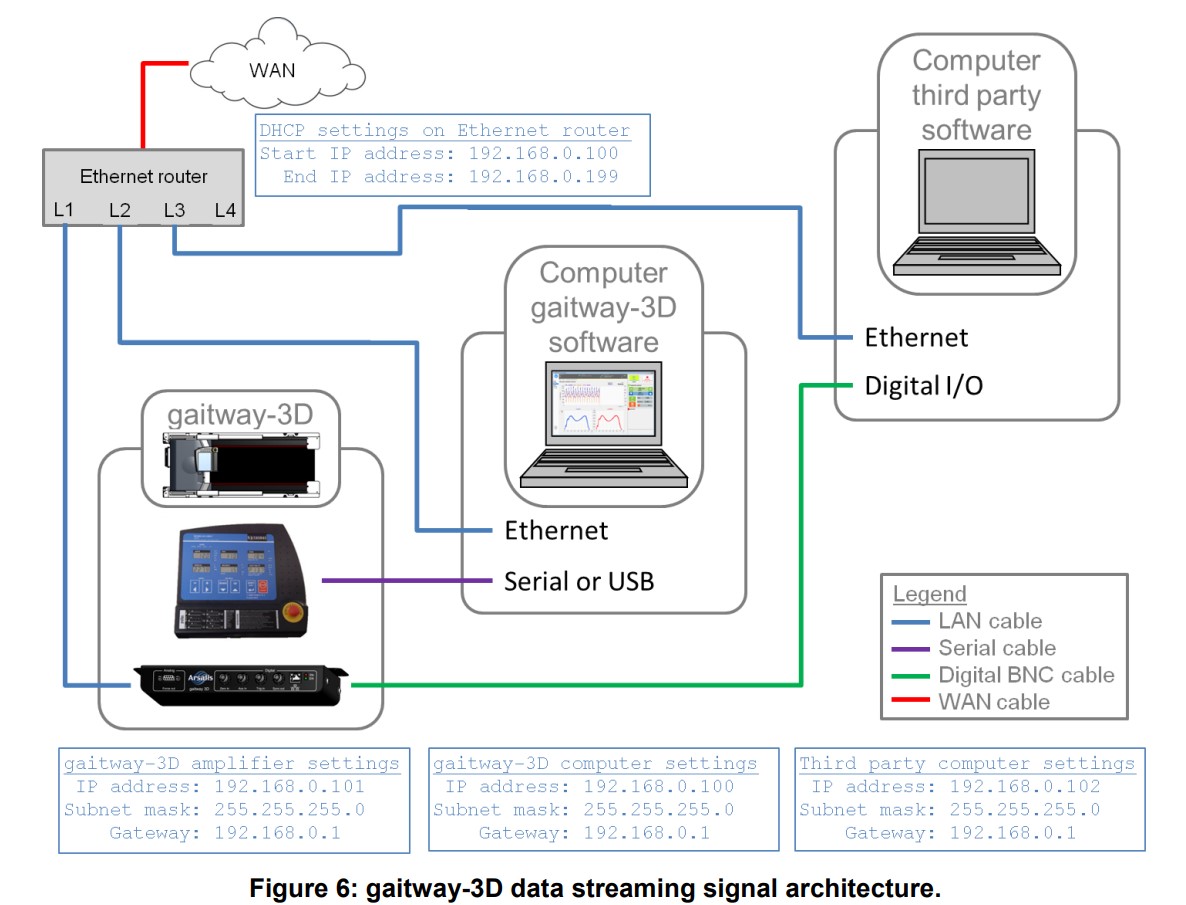
gaitway 3D data streaming signal architecture via LAN /
Ethernet RJ45
Download gaitway data streaming integration manual:
https://www.hpcosmos.com/sites/default/files/uploads/documents/20220802_cos102999_hpcosmos_tm-icd-0004-ars_a6_gaitway-3d_data_streaming_icd.pdf
MCU6 Hardware and Software Simulator:
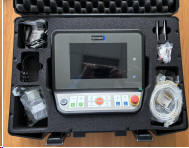
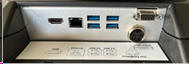
Download MCU6 Hardware and Software Simulator manual:
https://cloud.hpcosmos.com/s/yPQ4Fk37zEndMir
|
|
In order to make your work easier and to help all service & sales engineers
during installations please allow to make some suggestions according to our
experiences and for future improvements. There are always discussions and
queries how to find and select the right ergometer model. Following should be a
simple and effective solution and a great menu on the ECG, Ergospirometry or PC
for selecting the right ergometer type.
All of the below listed treadmill / ergometer types are made by h/p/cosmos and are
equipped with the same RS232 interface protocol: h/p/cosmos coscom v3 or coscom
v4.
- h/p/cosmos coscom v3
- h/p/cosmos coscom v4
- torqualizer coscom v4
- JAEGER coscom v3
- VIASYS coscom v3
- Vyaire coscom v3
- Vyaire coscom v4
- CareFusion coscom v3
- CORTEX coscom v4
- COSMED coscom v3
- COSMED coscom v4
- proxomed coscom v3
- proxomed coscom v3
- KISTLER coscom v3
- MAW coscom v3
- MAW coscom v4
- SCHILLER coscom v3
- SCHILLER coscom v3
- zebris coscom v3
- zebris coscom v4
- HUR coscom v3
- ProMedPlus coscom v3
- PHYSIOMED coscom v3
- NORAXON coscom v3
- NORAXON coscom v4
- emotion fitness coscom v3
- emotion fitness coscom v4
- Arsalis coscom v3
- Arsalis coscom v4
- CORTEX coscom v3
- CORTEX coscom v4
- Custo coscom v3
- Custo coscom v4
- ergoline coscom v3
- ergoline coscom v4
- JINBO medical coscom v3
- JINBO medical coscom v4
Please do not list the different models (h/p/cosmos mercury med, h/p/cosmos
pulsar, JAEGER Vyaire LE 200CE, etc.) as all models have the same protocol.
Furthermore we recommend to use treadmill symbols. h/p/cosmos provides true type
fonts with legends and image files for the different models.
Please also pay attention to some very important and interesting features of
the h/p/cosmos coscom protocol:
- Activation of the automatic stop (fail safe) of the treadmill
("time-out") after a cut of the RS232 communication (defective interface
cable, etc.)
- Error simulation on failsafe function (timeout simulation of broken
RS232 interface cable or PC failure or software crash) and with
status communication of stop button pressed on the treadmill have to be
made. If stop button was pressed on the treadmill, also the
load protocol on the host PC-Software or system has to stop and must not
continue to send speed or elevation commands automatically.
- Checksum and Acknowledgement have to be implemented in the interface
protocol accordingly.
- Implementation of the SunTech Tango Blood Pressure Monitor in the
h/p/cosmos coscom protocol. It would be great if your system offers to read
the Blood Pressure Date via the h/p/cosmos coscom protocol and also offers
to control the SunTech Tango system via the h/p/cosmos coscom protocol.
- Implementation of the "Acceleration and Deceleration levels" in the ECG
or Ergospirometry or PC Software menu. This is a frequently asked question
of the customers. Some of them are not happy if the treadmill speeds up
slow, some of them are not happy if it speeds up very fast.
All h/p/cosmos running machines offer an optional function where you can
select a permanent acceleration level for all incoming speed commands via
series interface RS232 h/p/cosmos coscom protocol. But it would be better
and much more comfortable to have a menu in your system.
Seven different acceleration levels and deceleration levels are
available for all modes and for remote control via RS232. Max. Acceleration
Level and minimum Acceleration Level see chapter: User Options / Optional
Functions in the treadmill manual.
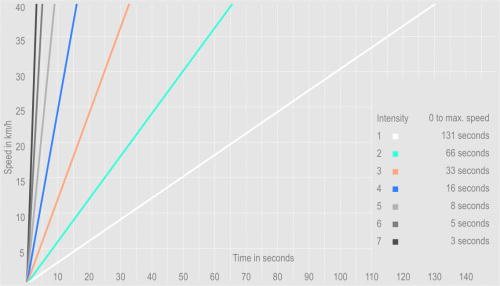
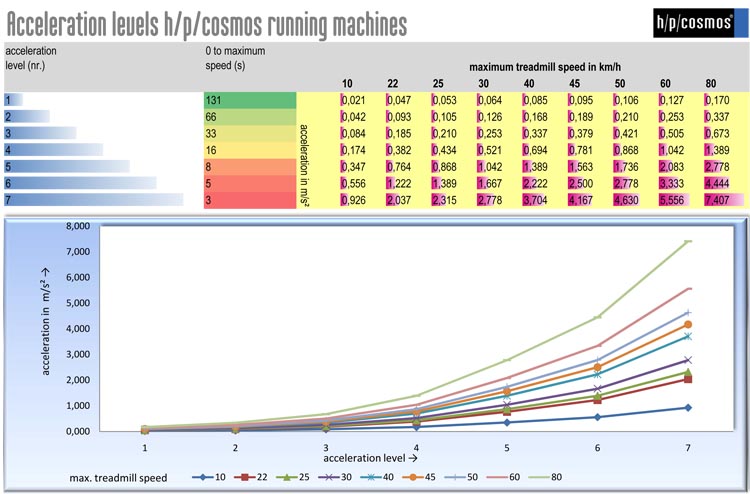
If the existing acceleration levels don't meet your needs, coscom also
offers the possibility to set the exact acceleration value in m/s.
All 5 features A, B, C, D and E would be a great advantage compared to
competitors too. Please also allow to introduce the PC software h/p/cosmos para
control. It looks like the original keyboard and display of the h/p/cosmos and
OEM versions. With this program you can remote control all Treadmill functions
from the PC. We recommend to install h/p/cosmos para control to the PC for
having following benefits:
- If the customer has a treadmill without UserTerminal Hardware: He
can easily control the treadmill without starting the ECG or
Ergospirometry Software by means of h/p/cosmos para control.
- If there are problems with the remote control of the treadmill it
is easy to check if the problem is in the ECG / Ergospirometry or in
the treadmill.
- If the customer has a treadmill without UserTerminal Hardware: For
Service and maintenance it is essential to have the h/p/cosmos para
control, because otherwise it is not possible to use the optional
functions of the treadmill. The ECG / Ergospirometry menu does not
offer access to the optional functions of the treadmill.
And last but not least, it would be great if in the ECG /
Ergospirometry installation menu is included a Word or html file with a
good instruction list (the right order, screen-shots, etc.) how to link
the treadmill and how to select the right treadmill type on the ECG /
Ergospirometry.
A hardware simulator is available for perfect testing of the RS232
interface communication. And you can always send us your software for
testing the communication. Ask for more details.
|
|
(e.g. with software h/p/cosmos para graphics or h/p/cosmos para control)
To be used for example with
h/p/cosmos para graphics,
h/p/cosmos para control, PC ECGs, Ergospirometry Devices. For connecting
your PC to the Running-Machine you need an interface cable (optional equipment)
9-pole Sub- D (male - female) with crossed transmission-receive-cable (PIN 2 and
PIN 3).
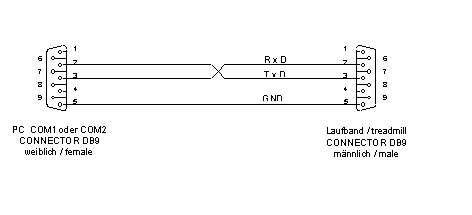
For control via USB interface an optional
converter
/ adapter cos12769-01 (USB-RS 232) is available
at h/p/cosmos.
For control via USB interface the processor on the PC must be Pentium 1.8 GHz
or higher.
|
| order numbers |
RS232
connecting cable 5 m
RS232 connecting cable 10 m
RS232
connecting cable 15 m
USB-RS 232
interface converter
/ adapter |
cos00097010034
cos00097010035
cos11889
cos12769-01 |
|
Please pay attention to following important functions, in case you are
controlling the treadmill:
In your software controlling the treadmill you have to terminate any
automatic load profile and set speed and elevation values to 0 (zero) after
- pressing "STOP" on the treadmill keyboard
- termination of the interface communication (maybe cable has been
disconnected by accident)
- the treadmill has been stopped via emergency button, which will fully power
off the treadmill (no interface communication)
The reason for that is: Many users control the treadmill via the RS232
interface (ECG, ergospirometry, PC-software, etc.) and an automatic load profile
(for example BRUCE protocol). Then the user press the normal STOP button on the
treadmill keyboard, since he had a treadmill with display and user terminal
(cockpit). The treadmill stops and the customer thought he was safe. But then
suddenly the treadmill speeds up again, because it received the next load signal
(speed and elevation value) from the ergospirometry or ECG.
It is of great importance to communicate via interface the "STOP-status" of
the h/p/cosmos coscom protocol, in case the system was stopped on the treadmill
keyboard and not on the stress test device (ergospirometry or ECG).
The same risk can occur if the treadmill was stopped in any other way
(treadmill power off, etc.) and the control device (ergospirometry or ECG) did
not get or did not consider this information and continues to send speed or
elevation commands via interface to the treadmill.
Please consider the safety timeout (Failsafe) of the communication protocol.
In case the interface connection will be terminated (e.g. the cable is cut or
somebody pulls the RS232 interface plug or in case the PC OS has a malfunction),
then the treadmill needs to stop automatically.
You can use the acceleration level (acceleration index or exact acceleration
value) for variations of speeding up or slowing down.
A very useful an highly appreciated feature.
To be in compliance with the latest safety standard, please send us your
control software together with a complete description of test routine. This will
allow h/p/cosmos to verify functions and safety. Also we can offer a special
hardware treadmill simulator for testing the RS232 hardware connection. Ask for
further details.
coscom interface protocol serves perfectly for communication with h/p/cosmos
software:
para control®
para graphics®
para analysis®
para motion®
|
What
risks arise if an interface protocol does not include a checksum?
|
|
If an interface protocol
does not include a checksum, several potential risks emerge,
particularly with regard to
data integrity, security, and reliability.
The most important risks are:
|
|
1. Loss of Data Integrity
-
Problem:
Transmitted data may be corrupted by electrical interference,
timing issues, or other physical influences.
-
Consequence:
Without a checksum, such errors may go undetected, leading to
incorrect or unusable data.
|
|
2. Security Risks
-
Problem:
Checksums can also serve as simple (not very safe) protection
mechanisms against manipulation.
-
Consequence:
Without integrity verification, attackers could alter data
packets unnoticed (e.g., in man-in-the-middle attacks).
|
|
3. Lack of Error Detection and Correction
-
Problem:
Systems cannot detect whether a packet has been corrupted.
-
Consequence:
There is no way to request retransmission or correct faulty data
(e.g., using CRC or Hamming code).
|
|
4. Synchronization Issues
-
Problem:
Communication protocols often use checksums for packet
validation.
-
Consequence:
Without this validation, synchronization between sender and
receiver may be disrupted, leading to communication breakdowns.
|
|
5. Reduced System Reliability
-
Problem:
Faulty data may be processed without detection.
-
Consequence:
This can cause system crashes, incorrect calculations, or faulty
decisions—particularly critical in industrial or medical
applications.
|
|
Example Scenarios:
-
RS232 without checksum: A single bit error caused by
electromagnetic interference goes undetected.
-
Bluetooth without integrity verification: A manipulated packet
could trigger false commands.
-
USB without error detection: A file transfer could contain
corrupted data without the user noticing.
|
|
Many older
(legacy) devices only have RS232 serial interfaces and no USB or
LAN.
What
does a secure configuration look like?
|
|

Computer or ECG or VO2max CPET
must not be connected to LAN, WiFi, clinical network, CIS
or internet!
RS232 interface connection cable to the treadmill or
ergometer must be monitored and protected against manipulation.
|
Interface and Communication Technology Standards:
|
|
no.
|
Technology / System / Hardware
|
Typical Encryption Methods
|
Encryption Layer
|
Notes,
Cybersecurity, Risks, Advantages, Disadvantages
|
Security
|
|
1)
|
RS232 Serial Interface
|
No native encryption; AES, TLS possible
|
Application layer
|
Must be implemented via software (e.g., TLS over
tunnel).
Advantages:
Simple, low latency
Disadvantages: No
security, easily intercepted
|
poor
|
|
2)
|
USB (as RS232 serial replacement)
|
No native encryption; AES, BitLocker, hardware-based
encryption
|
Application layer / Hardware
|
USB sticks can be hardware-encrypted; BitLocker &
similar provide OS-based encryption.
Advantages:
Widely used
Disadvantages:
Insecure without additional measures
|
poor
|
|
3)
|
USB modern / state of the art
|
TLS, USB/IP over SSL,
Hardware Security Module (HSM), FIDO2
|
Application layer / Hardware
|
Modern devices support secure communication (e.g.,
USB tokens, dongles).
Advantages:
High speed, strong encryption
Disadvantages:
Complex setup
|
good
|
|
4)
|
LAN (Ethernet)
|
MACsec, IPsec, TLS, SSH, VPN
|
Link (MACsec), Network (IPsec), Application layer
(TLS/SSH)
|
Advantages: High security by combining protocols
Disadvantages:
Performance overhead, complex configuration
|
good
|
|
5)
|
Wi-Fi / WLAN
|
WPA2, WPA3, VPN, TLS
|
Link (WPA), Application layer (TLS, VPN)
|
WPA3 is the current standard with forward secrecy.
VPN/TLS further enhance security.
Advantages:
Secure with WPA3
Disadvantages:
Vulnerable with weak passwords
|
good
|
|
6)
|
Bluetooth
|
SSP (Secure Simple Pairing), AES-CCM
|
Link layer
|
Since Bluetooth 4.0, AES-CCM is used. Security
strongly depends on pairing mode.
Advantages:
Built-in encryption
Disadvantages:
Vulnerable to MITM, limited range
|
medium
|
|
7)
|
Mobile Phone / 5G
|
128–256-bit encryption
(e.g., AES, SNOW 3G, ZUC)
|
Link and network layer
|
5G uses new security architectures such as SUPI/SUCI
encryption, network-based authentication.
Advantages: Very
secure, no user intervention needed
Disadvantages:
Dependent on provider
|
good
|
|
Summary
1.
In secure interface communication, checksums, acknowledgement, failsafe
and status communication are mandatory. Validate cybersecurity via
PEN-Tests and validate safety features via test and release
template:
download
2.
RS232 interface connections must be replaced with more modern technology
such as LAN/Ethernet or USB if the computer, ECG, or VO2max CPET is
to be connected to a LAN, WLAN/WiFi, hospital network, hospital
information system, or the internet. In case you still use RS232,
the RS232 interface connection cable to the treadmill/ergometer
additionally must be monitored and protected against tampering.
3.
As soon as possible, interface communications between treadmills or
ergometers should be encrypted to improve cybersecurity.
4.
The
h/p/cosmos coscom v4 is an enhancement to coscom v3 especially in
terms of safety.
5.
coscom
v4 is much more simple in it’s architecture compared to coscom v3,
because all special features (like firmware update and programming
features) remain in coscom v3.
coscom v4 significantly reduces the needed
documentation and training time.
6.
Important standards / norms like EN 62304 Software Lifecycle Processes
for medical devices and ISO 14971 Risk Management as well as
Cybersecurity can be achieved in your projects with coscom v4.
7.
The coscom_v4.dll are a great help for programmers to implement
sophisticated functions with minor effort.
8.
coscom v4 allow the use of the free PC software para control, so the
treadmills and ergometers can be remote controlled and programmed
via external PC or laptop and also important features like firmware
update, error diagnostics, resets, etc can be performed via the
external h/p/cosmos Windows software para control.
9.
All h/p/cosmos and h/p/cosmos OEM treadmills with MCU5 from manufacturing
date 2019 are equipped with coscom v3 and additionally with coscom
v4. coscom v3 meanwhile has been discontinued.
10.
Update your ECG, VO2max and CPET
devices and other equipment and software to coscom v4 in time,
because due to MDR regulatory affairs and technology reasons all new
MCU6 UserTerminals with or without TouchScreen launched from the
year 2020 for treadmills and ergometers will not have coscom v3
protocols included any more. Only coscom v4 is in compliance with
latest cybersecurity requirements.
11.
TMX 425, TMX428, TMX428CP, TMX58
or T2100 or other interface emulations:
Warning and Disclaimer!
This interface protocol is not
validated by h/p/cosmos and not released for medical applications in
compliance with standard EN 62304 and regulatory compliance.
The system producer / configurator
(economic operator) is responsible and liable for sufficient
testing, release, validation, regulatory compliance (also MDR (EU)
2017/745, risk management and Cybersecurity) and documentation of
these combined devices (h/p/cosmos treadmill and external control
device, such as ECG, CPET, stress test device, etc.) in case of
utilizing this protocol emulation.
h/p/cosmos rejects all claims and
all liability for any issues related to the usage of this interface
protocol.
h/p/cosmos validates and
recommends only the coscom v4 interface protocol. See
www.coscom.org
Latest warnings and FSN Field Safety Notices see
website:
https://www.hpcosmos.com/en/safety
|
(c) Copyright 1992 - 2025 Franz Harrer & h/p/cosmos sports & medical gmbh.
All rights reserved. E & OE.
coscom® and h/p/cosmos coscom®
and h/p/cosmos®
are registered trademarks of Franz Harrer and/or h/p/cosmos sports & medical
gmbh.
 ® ®
The website for the high profile coscom modular MES Solutions for the
Manufacturing Industry: CAD CAM, MDC, EDC, Control Center, Cell/Tool Management,
DNC, PDM from COSCOM Computer GmbH can be found here:
www.coscom.de
|
|
|